No errors. No console warnings. No obvious fixes. Safari’s password autofill refused to work in production.

The Jira ticket that started it all.
After wrapping up a few simple tickets on a Friday afternoon, I made the infamous mistake of tackling a “quick bug” after eating tons of food at lunch.
I was full, a little sleepy, and super confident that this would be a five minute fix. Until it wasn’t.
What was the issue?
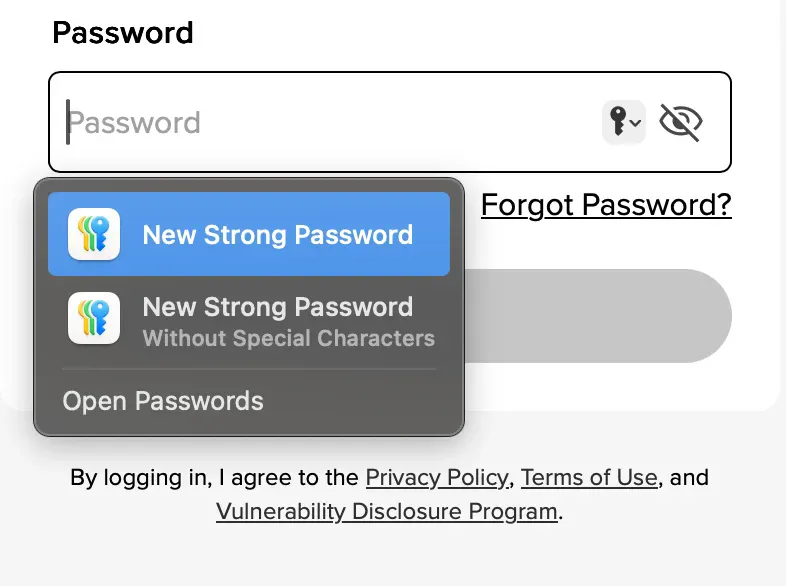
The issue was that Safari refused to automatically autofill saved passwords on our authentication page.
Apple users had their passwords stored in Apple Passwords/Keychain app, but it was treating them as if they were a new user. The autofill popup form would prompt them to create a “New Strong Password” instead of suggesting them their saved credentials from Apple Passwords/Keychain.
Users were only able to get suggested their saved credentials by clicking on the lock icon next to the password field to access Touch ID/Face ID autofill.
If users are still able to get to their credentials, then why fix the issue?
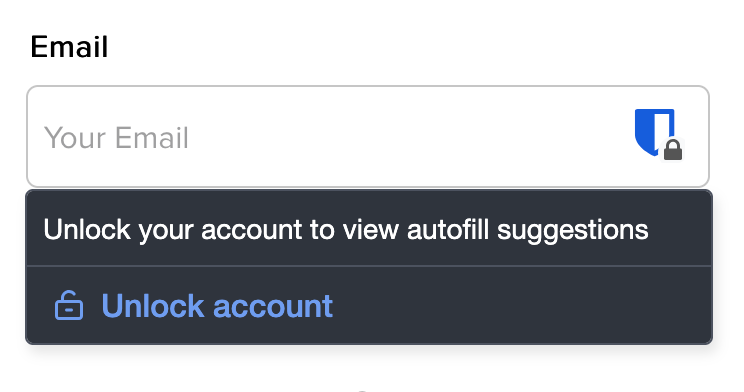
It is critical that this issue gets fixed as it creates poor UX (user experience) since the users need to know about this extra step and perform additional manual work. Third party password managers (like 1Password and Bitwarden) may cover up the lock icon, making it even more difficult to access!
Sounds simple. Right?
Wrong.
Before landing on the root cause, I spent several hours chasing what looked like a typical autofill configuration issue. I verified everything that Safari’s documentation usually points to:
- Correct type=“password” and autocomplete attributes.
- Proper “name” and “id” values.
- Used static form fields to avoid React’s dynamic rendering.
- Lifting up the login component up the tree to remove context and abstractions.
None of it worked.
Even when stripped down to a static password input field, Safari would continue to ask me for a “New Strong Password”. To isolate the issue even further, I booted up another React app and created a simple login form there. To my absolute, surprise it worked. The form behaved exactly as expected despite not having the correct attributes and name values.
I started to note down the differences between the two projects:
- Older version of React vs Newer version of React.
- Class-based components vs functional components.
- Use of ref in the form fields.
- Different build tooling (yarn vs npm).
While these differences were notable, they still didn’t explain the strange behavior.
The Breakthrough.
The breakthrough came when I inspected the raw index.html file. Buried near the top was a seemingly harmless line:
<base href="//s3.amazonaws.com/medium/" />(Note: For the clarity in this article, the path segment following the domain has been anonymized.)
Followed by:
<link rel="stylesheet" href="styles.css" />
<link rel="icon" href="favicon.ico" />
Once I removed this line, Safari autofill immediately started working.
What the <base> element does (and why it matters).
The HTML <base> element defines the base URL for all relative URLs in the document. Once it is set, any relative path on the page is resolved against it.
For example:
<base href="//s3.amazonaws.com/medium/" />
<link rel="stylesheet" href="styles.css" />
<link rel="icon" href="favicon.ico" />
With the <base> tag in place, each of these relative paths correctly resolves to:
https://s3.amazonaws.com/medium/styles.css
https://s3.amazonaws.com/medium/favicon.ico
This worked as intended for asset loading and has been stable for a long time. It existed purely as a convenience thing to avoid repeating long absolute URLs throughout index.html.
How does this relate to our form?
The form was not supposed to be affected at all. Traditionally, forms in HTML had an action attribute that specifies where to POST the data to. As shown below:
<form method="POST" action="/login">
  <input type="email" name="email" autocomplete="username" />
  <input type="password" name="password" autocomplete="current-password" />
  <button type="submit">Sign in</button>
</form>
If the base element (shown below) was specified, it takes precedence when resolving relative URLs. In this case, the form’s action=“/login” would resolve to https://s3.amazonaws.com/medium/login, even though the page itself was loaded from https://medium.com.
<base href="//s3.amazonaws.com/medium/" />In more modern applications like the production app I was working on, the form exists for mostly structure and accessibility. Submission is intercepted and handled via JavaScript instead, as shown in the example below:
import { useState } from "react";

export default function LoginForm() {
  const [email, setEmail] = useState("");
  const [password, setPassword] = useState("");
  const [loading, setLoading] = useState(false);

  async function handleSubmit(e) {
    e.preventDefault();
    setLoading(true);

    await fetch("/api/login", {
      method: "POST",
      headers: {
        "Content-Type": "application/json",
      },
      body: JSON.stringify({ email, password }),
    });

    setLoading(false);
  }

  return (
    <form onSubmit={handleSubmit}>
      <label>
        Email
        <input
          type="email"
          name="email"
          autoComplete="username"
          value={email}
          onChange={(e) => setEmail(e.target.value)}
          required
        />
      </label>

      <label>
        Password
        <input
          type="password"
          name="password"
          autoComplete="current-password"
          value={password}
          onChange={(e) => setPassword(e.target.value)}
          required
        />
      </label>

      <button type="submit" disabled={loading}>
        {loading ? "Signing in…" : "Sign in"}
      </button>
    </form>
  );
}
Why Safari still evaluated it anyway.
Safari’s password autofill logic does not care about how React handles submission at runtime. Instead it evaluates the static HTML structure that is loaded in when the user accesses the page. So, it asks questions like:
- Is there a password field?
- Is it inside of a <form>?
- Where could this form submit if it were allowed to?
The last question is key. If a <base> element is present, Safari resolves the form’s potential destination using the base URL found in that element, even if the form never actually submits.
So despite the fact that:
- React prevents the submission.
- fetch handles the authentication.
- The form has no action attribute.
Safari still sees a password field whose form resolves to a destination that appears to be cross-origin, and disables autofill as a security precaution.
The fix.
Given the context, you may have already been able to piece together what the fix was.
Before:
<!-- index.html -->
<head>
  <base href="//s3.amazonaws.com/medium/" />
  <link rel="stylesheet" href="styles.css" />
  <link rel="icon" href="favicon.ico" />
</head>

<body>
  <div id="root"></div>
</body>
The <base> tag made asset paths convenient, but it also rewrote how the browser resolved every relative URL in the document, including how Safari evaluated the login form.
After:
<!-- index.html -->
<head>
  <link rel="stylesheet" href="https://s3.amazonaws.com/medium/styles.css" />
  <link rel="icon" href="https://s3.amazonaws.com/medium/favicon.ico" />
</head>

<body>
  <div id="root"></div>
</body>
By removing the <base> element and switching to explicit, absolute URLs for our assets, we eliminated the ambiguity Safari was reacting to. Password autofill immediately started working again and there were no other changes required.
Was the fix simple?
Yes.
It was one deletion and two line modifications.
Was I annoyed?
Absolutely.
But that’s often how these bugs go: hours of investigation, multiple false leads, and the final fix ends up being a single line you hadn’t looked at in years.
Final Takeaways.
This issue wasn’t caused by React, Safari, or our authentication logic. Even in modern, JavaScript-driven applications, browsers still reason about forms at the HTML level. Safari’s autofill logic evaluated where credentials could be submitted, saw ambiguity introduced by the <base> element, and disabled autofill as a security precaution.
The fix was simple, but the lesson was not: HTML still matters. When debugging browser-specific issues don’t forget to inspect the raw document. Sometimes the bug isn’t in your framework at all. It might be a single <base> tag quietly doing exactly what it’s designed to do.